

Aug 07
Follow these steps to unhide a Facebook Friend that you have hidden:
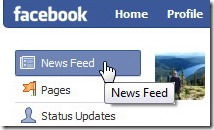
Step 1. In Facebook, click the News Feed link, which is usually on the top-left corner of the window:
Step 2. Scroll the window down to the bottom of the webpage. Click the Edit Options link:

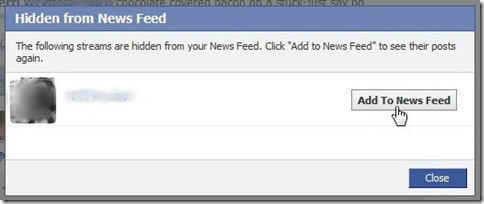
Step 3. The “Hidden from News Feed” window will appear. Click the Add to News Feed button to the right of the Facebook Friend you want to unhide:


Article published on August 7, 2009
If you like this article, please share it:
|
August 8th, 2009 at 11:52 am
[…] timm wrote an interesting post today onHow to Unhide a <b>Facebook</b> FriendHere’s a quick excerpt […]
August 8th, 2009 at 11:51 pm
[…] timm wrote an interesting post today onHow to Unhide a <b>Facebook Friend</b>Here’s a quick excerpt […]
September 12th, 2009 at 10:43 am
awesome tip. very easy to understand. thnx
September 30th, 2009 at 10:53 pm
Thanks for your help!
October 19th, 2009 at 5:50 am
Thank you! VERY helpful, simple & clear with the pictures.
Thanks 🙂
November 10th, 2009 at 11:14 am
I cant open New feed to unhide a friend… now what ???
December 29th, 2009 at 4:26 am
Thanks for the tip, I blocked a few people by mistake
March 21st, 2010 at 1:13 pm
Thanks so much, accidentally hid farmville, and could not get it back no matter what I tried. Now I have it back in my feed..
April 14th, 2010 at 1:40 pm
Thank you! Also hid farmville! Thanks!!2
May 13th, 2010 at 2:03 am
thanks yar…………..
July 11th, 2010 at 3:14 pm
THANK YOU!! 😀 This helped tremendously.
August 14th, 2010 at 11:34 am
Great Website. It works quickly. I was told a person could not be UNHIDE, but you did it it…. thanks…
October 27th, 2010 at 2:30 am
google many website but it doesn’t work until finding here, thanks man
November 23rd, 2010 at 1:22 pm
Thanks! That was very helpful. I was going nuts trying to figure that out.
May 27th, 2011 at 9:18 am
[…] The “Hidden from News Feed” devtopics.com […]