

Jul 02
While developing software, you may encounter errors that are recorded in the application event log:
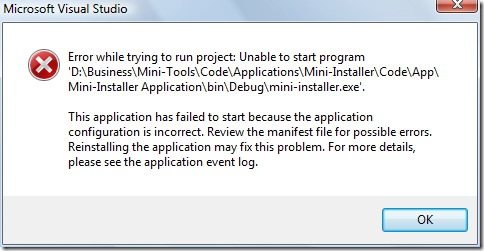
To view the application event log:
-
Click the Windows Start button.
-
In Windows Vista, type Event Viewer in the Start Search field. In Windows XP, click All Programs, click Administrative Tools, and then click Event Viewer.
-
The Event Viewer window appears. In the tree pane on the left, double-click Windows Logs, then click Application to see the list of application events.
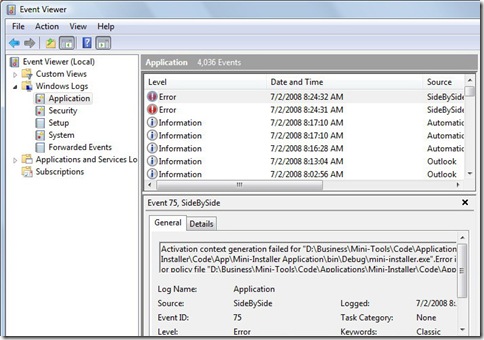


Article published on July 2, 2008
If you like this article, please share it:
|
February 17th, 2010 at 11:56 am
I am trying to open the windows vista event viewer, in order to open my avast antivirus registration form. However, the virus on my laptop is not even letting me open the application log to fix the file that avast is located in. What steps should i follow to fix this problem?
May 17th, 2010 at 9:14 pm
I want to play a game that I downloaded but it keeps saying the application has failed to start because the side-by-side configuration is incorrect
October 27th, 2010 at 5:42 pm
I am trying to play videos that I just uploaded from my new Kodak EasyShare Z981 camera. The response I get is ……”the application has failed to start because its side-by-side configuation is incorrect. Please see the application event log for more details.” I do not know where to find the “application event log.” If you can help, please advise. I have Windows Vista.
February 14th, 2011 at 12:37 am
Every time I try to open Outlook 2010 I get this error.
Please help!!!!
The application has failed to start because its side-to-side configuration is incorrect. Please see the application event log for more detail.
March 11th, 2011 at 7:26 am
hihi i tried opening windows live messenger but it stated that the side by side configuration is incorrect.Please see the application event log for more detail.
March 11th, 2011 at 7:27 am
hihi i tried opening windows live messenger but it stated that the side by side configuration is incorrect.Please see the application event log for more detail..
March 13th, 2011 at 3:30 pm
hi i tried opening windows live messenger but said the side by side configuration is incorrect see application event log for more detail
i have done that but still dont know wat to do i have uninstalled windows live essentials reinstalled it but still get the same error how do i fix this
March 27th, 2011 at 7:52 am
Everytime I open any Microsoft Office 2010 Professional program I get the following message: The application has failed to start because its side-to-side configuration is incorrect. Please see the application event log for more detail. I have been told to uninstall Office 2010 and reinstall but I do not want to lose my calendar and contacts in Outlook. Is there any way to fix this without a reinstall?
April 28th, 2011 at 10:04 pm
I try and open up my Windows Live Messenger and I continue to receive the message:
The application has failed to start because its side-to-side configuration is incorrect. Please see the application event log for more detail.
May 31st, 2011 at 12:44 am
when i try to open nsngr it tells me the side by side configuration is incorrect and to open events log but it wont open
June 12th, 2011 at 4:09 am
Nic Says:
February 14th, 2011 at 12:37 am
Every time I try to open Outlook 2010 I get this error.
Please help!!!!
The application has failed to start because its side-to-side configuration is incorrect. Please see the application event log for more detail.
June 19th, 2011 at 12:13 pm
i was trying to print woderword puzzle, the following message cme on: the application to start because its side by side configuration is incorrect please see the application log for more details. this happens when i click on the pdf for printing the puzzle. thanks
September 2nd, 2011 at 2:58 pm
this message is driving me insane. event log, side by side. all i wanna do is use messenger. raaa…somebody must be able to help :'(
February 23rd, 2013 at 8:48 am
I need help! Can’t use my window live messenger…..no matter what I do